
.png)

Getting Started with Modules

Dec 05, 2025
 59
59
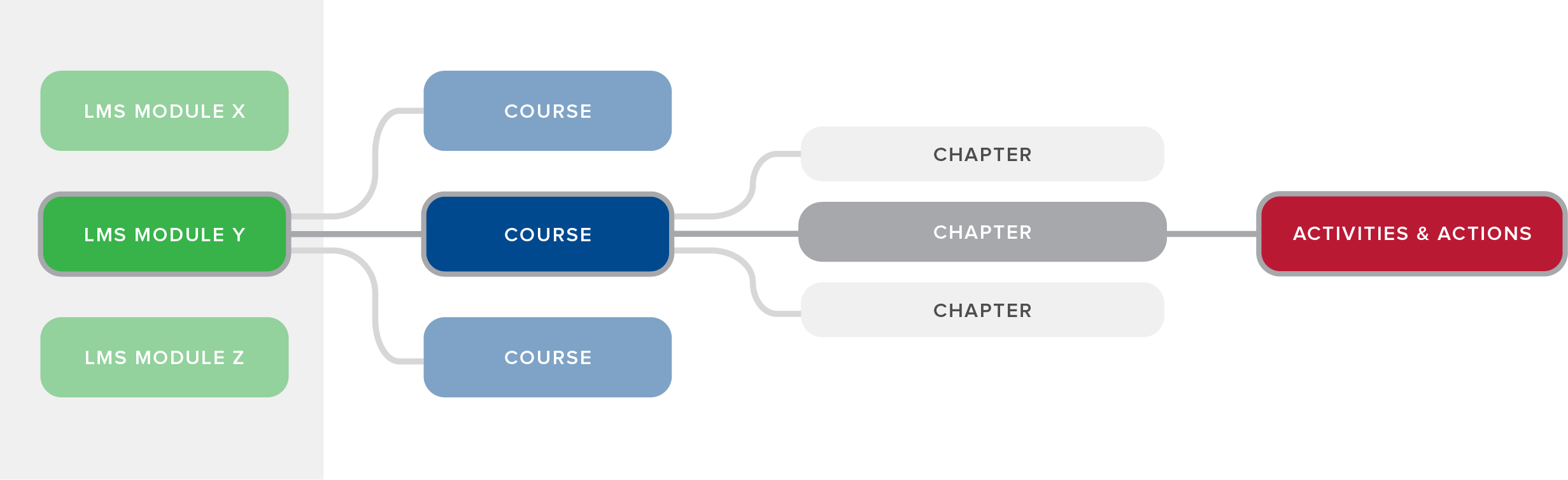
The GZ Learn is presented to users through Modules (Fig. 1). Each module holds an entire learning journey, though their structure may vary.

- Modules are the highest level of organization in your LMS. Modules function like a "school" — each Module is configured as a separate learning experience
- Courses function like a "class" within a Module. Courses provide LMS authors the first level of learning content organization
- Chapters within a Course present learning content in small segments, focusing on specific concepts or ideas
- Activities within Chapters may require:
- Watching a linked or uploaded video
- Viewing a slideshow
- Reading content
- Downloading content
- Actions following Activities may include different types of quiz questions:
- Multiple choice
- True or false
- Fill in the blank
LMS MODULE STRUCTURE OPTIONS
GZ Learn modules can be structured in one of three ways. Once you choose an option, it is not possible to omit any of the levels within its hierarchy. However, there can be any number of "children" within each "parent" element in the hierarchy. For example, if choosing the Full Structure module, it must include at least one course, one chapter, and associated activities and actions, but can contain as many of each as needed.
- Full Structure: Module > Courses > Chapters > Activities & Actions (Fig. 2)
- No Courses: Module > Chapters > Activities & Actions (Fig. 3)
- No Courses or Chapters: Module > Activities & Actions (Fig. 4)


To learn more about Modules, read the Adding and Managing Modules and Module Settings documentation.

